Test a real candidate
Evaluate a selected product rather than a generic look-alike.

ARK AI DESIGN SKILL · AI furniture replacement
Replace a sofa, chair, table, light, or accessory while retaining the scene composition, helping teams judge form, color, and stylistic fit.
The video could not be loaded. The preview and page remain available.
Capability
Replace a sofa, chair, table, light, or accessory while retaining the scene composition, helping teams judge form, color, and stylistic fit.
The AI blends product shape, view, material, and scene lighting, but occlusion, perspective, scale, and small product details may differ. The image cannot verify dimensions, color, load, installation, or delivery access. Confirm specifications and site measurements before purchase.
Evaluate a selected product rather than a generic look-alike.
Judge the item against the existing light, palette, and furniture.
Show clients the likely visual impact of a replacement.
Swap several candidates to build a clearer shortlist.
Prepare the input
Clear source material and an explicit design objective give the model better evidence to work from. Use these checks before generation.
Start with an interior scene, a clear target-product image, and the replacement area. Use a clear source that keeps the subject and the evidence needed for this task visible.
The production skill provides Upload space image, Product image.
The production skill generates from the visible source material and the selected controls.
The image cannot verify dimensions, color, load, installation, or delivery access. Confirm specifications and site measurements before purchase.
How to use
Keep the first pass exploratory, compare alternatives, then carry the selected direction into the rest of the project.
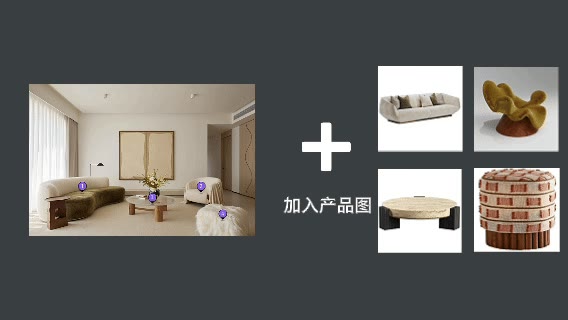
Use a clear source that keeps the subject and the evidence needed for this task visible. Prepare these inputs: Upload space image, Product image. Include optional inputs when needed.
Review the inputs for clarity, completeness, and consistent references. This skill has no additional visible settings; generate after confirming the inputs.
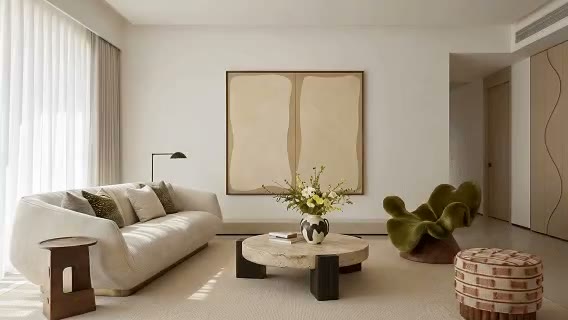
The production skill generates from the visible source material and the selected controls. Check the result against the source material. The image cannot verify dimensions, color, load, installation, or delivery access. Confirm specifications and site measurements before purchase.
Official skill video
This example is published for this exact skill. It is shown as one complete official reference, not as an independently verified input/output pair or a promised result for your upload.
What the AI reads
The AI blends product shape, view, material, and scene lighting, but occlusion, perspective, scale, and small product details may differ.
The image cannot verify dimensions, color, load, installation, or delivery access. Confirm specifications and site measurements before purchase.
Practical guidance
Use a clear source that keeps the subject and the evidence needed for this task visible.
This skill provides Upload space image, Product image; select only the settings needed for the current decision.
The AI blends product shape, view, material, and scene lighting, but occlusion, perspective, scale, and small product details may differ.
The image cannot verify dimensions, color, load, installation, or delivery access. Confirm specifications and site measurements before purchase.
Where it helps
Use a room image with the selected product integrated to compare directions and align stakeholders during pre-purchase furniture previews.
Use a room image with the selected product integrated to compare directions and align stakeholders during designer sourcing proposals.
Use a room image with the selected product integrated to compare directions and align stakeholders during retail consultations.
Use a room image with the selected product integrated to compare directions and align stakeholders during brand product placement tests.
Workflow comparison
AI accelerates early exploration and comparison; established professional workflows protect accuracy, feasibility, and formal delivery.
| Decision point | AI Furniture Replacement | Conventional workflow |
|---|---|---|
| Starting point | Begin with an interior scene, a clear target-product image, and the replacement area | Begin with structured requirements and production-ready data |
| Iteration | Compare several visual directions quickly | Revise and reproduce each option manually |
| Best use | Direction, atmosphere, composition, and early communication | Dimensions, specifications, feasibility, and formal approval |
| Output role | A proposal for selection and discussion | Verified data for production, construction, or publication |
Use AI to narrow the direction for a room image with the selected product integrated, then verify the selected option through the appropriate professional workflow.
FAQ
Start with an interior scene, a clear target-product image, and the replacement area. Use a clear source that keeps the subject and the evidence needed for this task visible.
The production skill provides Upload space image, Product image.
The production skill generates from the visible source material and the selected controls. The AI blends product shape, view, material, and scene lighting, but occlusion, perspective, scale, and small product details may differ.
Use it for exploration and communication, then follow this boundary: The image cannot verify dimensions, color, load, installation, or delivery access. Confirm specifications and site measurements before purchase.
Ark AI
Start with real project material, compare a few directions, and keep developing the selected result in the Ark AI canvas.