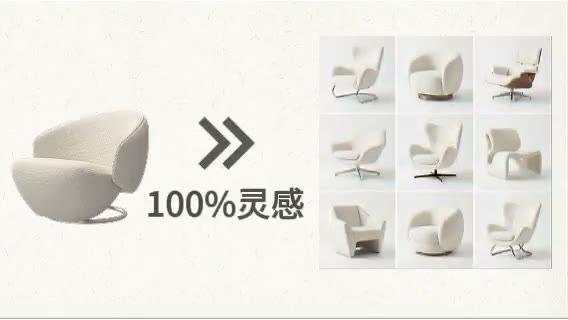
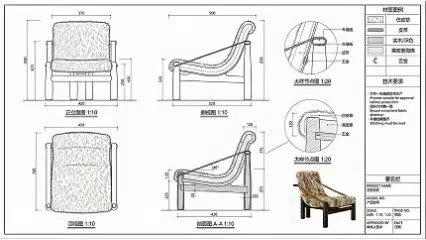
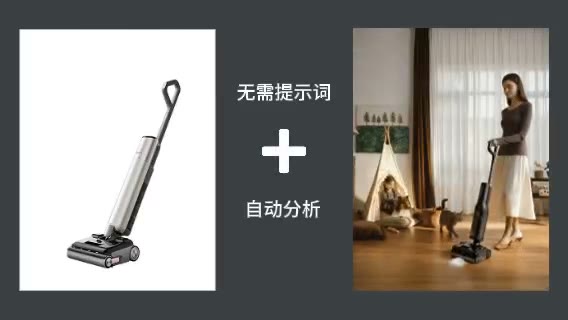
Extract design language
Make silhouette, proportion, support, material, and detail available for discussion.

ARK AI DESIGN SKILL · AI product sketch generator
Analyze silhouette, proportion, support, components, material, and detail, then organize those observations into multi-view sketches, callouts, palettes, and conceptual notes.
The demo could not be loaded. The preview and page remain available.
Capability
An AI product sketch generator extracts visible silhouette, proportion, support, components, material, and distinctive features from a finished-product image, then reorganizes them through sketches, arrows, enlarged details, palettes, and annotations. It helps a team discuss the visual logic of a product instead of leaving references as an unstructured image collection.
The output is useful for inspiration research, design retrospectives, internal reviews, and proposal layouts. A single photograph cannot reveal the back, interior connections, measured dimensions, or actual manufacturing process. Generated notes are conceptual observations, and any third-party product must be handled with appropriate image, design, patent, and trademark awareness.
Make silhouette, proportion, support, material, and detail available for discussion.
Explore front, side, detail, and structural views around one product image.
Turn loose references into an annotated design study with explicit observations.
Sketches and callouts explain intent more clearly than verbal descriptions alone.
Prepare the input
Clear source material and an explicit design objective give the model better evidence to work from. Use these checks before generation.
Keep the subject unobstructed with silhouette, grounding, and main components visible.
Avoid heavy compression and glare so timber, textile, metal, or plastic remains readable.
Clarify whether the board supports research, review, proposal, or teaching.
For owned products, compare results against source sketches, dimensions, structures, and process documents.
How to use
Keep the first pass exploratory, compare alternatives, then carry the selected direction into the rest of the project.

Use a clear image that communicates the full form, proportion, and key materials. Prepare these inputs: Upload Product Image. Include optional inputs when needed.
Set Image Ratio, Hand-drawn Style Type for this task, then confirm before generating.
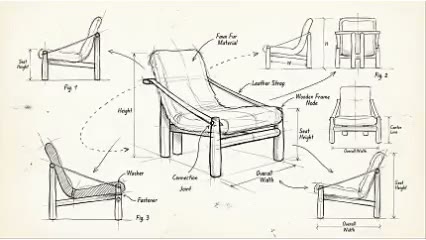
Check view consistency, annotation plausibility, and whether statements are supported by the source. Add verified dimensions and design notes before using the page in a review or proposal.
Official skill demo
This example is published for this exact skill. It is shown as one complete official reference, not as an independently verified input/output pair or a promised result for your upload.
What the AI reads
The model can read contours, highlights, part boundaries, and surface character. It cannot see internal construction or know measured dimensions and manufacturing methods.
Use generated sketches for conceptual expression and research. Product development must use controlled source data and professional documentation, while third-party references require appropriate rights handling.
Practical guidance
Focus on one or two topics such as silhouette, support, ergonomics, or material instead of filling the board with generic notes.
Front, side, rear, and detail images reduce speculation around hidden areas.
Delete or label any dimension, function, or process statement that cannot be verified.
Record product, designer, brand, and image sources so analysis is not confused with proof of authorship.
Where it helps
Summarize form, structure, and material strategies from a finished product.
Turn references into categorized studies with explicit observations.
Create a quick board for discussing form, detail, and potential questions.
Add a visual explanation of product language and concept exploration.
Workflow comparison
AI rapidly generates an explanatory board. Authentic industrial design sketching records the designer’s reasoning, dimensional control, testing, and manufacturability decisions.
| Decision point | AI Product Sketch Generator | Conventional workflow |
|---|---|---|
| Information source | Reverse-interprets a finished image | Comes from research, design process, models, and tests |
| Expression speed | Rapidly suggests views and annotation directions | A designer deliberately develops proportion and intent |
| Structural confidence | Hidden information may be imagined | Can use real engineering and prototype data |
| Best use | Research, proposals, and discussion sketches | Original design development and controlled records |
Treat AI as a fast visual-analysis assistant. A meaningful product sketch still needs the designer’s own problem framing, reasoning, validation, and iteration.
FAQ
It can suggest them, but side, rear, and internal information is inferred. Add real views or 3D data for accuracy.
No. Use physical measurement, CAD, or controlled engineering data for every real dimension.
You can research with appropriate source records and respect for image, trademark, design, and patent rights.
No. A generated interpretation does not prove authorship, originality, process, or ownership.
Ark AI
Start with real project material, compare a few directions, and keep developing the selected result in the Ark AI canvas.